The kwt guide
How to use kwt, from registering a project to embedding it in your own tools. Each section links to the documentation for exact commands, JSON fields, and configuration.
-
Register a project
There is no init step. Run
kwtinside a repository and it becomes a registered project. The dashboard opens with its primary checkout and any linked worktrees, next to the other registered projects. A directory that is not a repository becomes a directory workspace: a tmux session with no Git behavior.Registration is stored in
registry.jsonunderKWT_HOME, next toconfig.tomland pull-request records. kwt writes nothing into the repository.$ cd ~/code/widget $ kwt # widget is now a registered project; the dashboard opens # with main [primary] selected and every other project listed $ kwt projects github.com/acme/widget ~/code/widget github.com/acme/gadget ~/code/gadget -
Create a worktree
Press n in the dashboard, or run
kwt add -b, to create a branch, its worktree, and its tmux workspace. Worktrees go under a configured base directory with a configured naming rule, so you do not choose a path.Press b, or run
kwt add --from, to check out a branch that already exists locally or on a remote. Those worktrees start inert. kwt runs no hooks, setup commands, or file copies and starts no workspace until you open the worktree yourself.$ kwt add -b feature/new-ui # branch created, checkout at ~/worktrees/widget-feature-new-ui, # workspace started with the current layout $ kwt add --from origin/contrib-fix contrib-fix # worktree created; nothing run, nothing launched # review it, then open it $ kwt changes "$(kwt get contrib-fix)" $ kwt open "$(kwt get contrib-fix)" -
Configure a layout
Name agent commands under
[agents]and combine them into a preset under[[layouts.presets]]. Every workspace that uses the preset opens with those panes running. An empty pane string is a plain shell.Layouts are opt-in. Select one with
--layout, the L key, orlayouts.default. The reserved namenonegives a single blank pane. A repository's.kwt.tomlcan set a local default once you have trusted the file.~/.config/kwt/config.toml [agents] codex = "codex" roborev = "roborev tui" [[layouts.presets]] name = "review" arrange = "even-horizontal" panes = ["agent:codex", "agent:roborev", ""] # then: $ kwt add -b fix/flaky-status --layout review $ kwt config set layouts.default review -
Run commands in a worktree
Press enter or run
kwt opento attach. Agents do not need tmux:kwt execruns a command with the worktree as its working directory, andkwt getprints the path.Workspaces run on kwt's own tmux server,
tmux -L kwt, separate from your other sessions. A terminal client that manages its own attachment runskwt openwith--start-session --jsonand attaches to the endpoint kwt reports.$ kwt open fix/flaky-status # attaches; creates the session with the layout if needed $ kwt exec fix/flaky-status -- go test ./internal/status ok go.kenn.io/kwt/internal/status 1.204s $ kwt open "$(kwt get fix/flaky-status)" --start-session --json { "session_name": "kwt-wt-widget-fix-flaky-status-…", "tmux_socket_name": "kwt", "tmux_attach_mode": "direct" } -
Inspect changes
kwt statussummarizes every worktree across projects: branch, dirty files, ahead, behind, and last activity.kwt changeslists the changed files in one worktree, staged and working-tree sides separately, including untracked files, renames, deletions, and conflicts.Both are read-only. With
--jsonthe result carries the worktree'sgeneration. Pass--expected-generationto make kwt fail if the checkout you reviewed has been replaced.kwt list --jsonis the inventory for the rest of your tooling.$ kwt changes "$(kwt get fix/flaky-status)" \ --expected-repository github.com/acme/widget \ --expected-generation 0123456789abcdef… --json { "worktree": { "repository": "github.com/acme/widget", "path": "…", "generation": "0123456789abcdef…" }, "changes": { "state": "modified", "summary": { "modified": 1, "added": 0, "deleted": 0, "untracked": 1, "staged": 0, "conflicts": 0 }, "files": [ { "path": "internal/status/poll.go", "worktree": "modified" }, { "path": "internal/status/poll_test.go", "worktree": "untracked" } ] }, "observed_at": "2026-09-04T14:02:11Z" } -
Import a pull request
kwt pr listshows a project's pull requests.kwt pr importcreates an inert worktree for one of them and keeps the contributor branch's push destination, so a fix you push goes where the pull request expects. Repository setup and agent commands do not run until you choose to run them.Attach only with
kwt pr attach.kwt openand the dashboard refuse imported pull-request worktrees.kwt pr attachrechecks the worktree and its recorded project, then creates or repairs the session on a workspace-specific tmux socket.$ kwt pr list --project github.com/acme/widget --state open --json $ kwt pr import github:github.com/acme/widget#17 \ --project github.com/acme/widget --json { "workspace": { "path": "~/worktrees/widget-pr-17", … }, … } $ kwt changes ~/worktrees/widget-pr-17 $ kwt pr attach ~/worktrees/widget-pr-17 # kwt open refuses this path; use kwt pr attach -
Remove and prune worktrees
kwt remove -bremoves a worktree and its branch. It refuses when the checkout is dirty or a running process is inside it, and lists the process IDs.kwt pruneneeds a policy,--expiredor--merged, and--dry-runprints every decision first. Merged pruning requires a merged pull request and keeps the local branch.kwt doctorfinds broken backlinks, stale metadata, and registry drift without changing anything.kwt doctor --fixrepairs only findings with one correct repair, rescans, and reports what remains.$ kwt remove --dry-run feature/new-ui $ kwt remove -b feature/new-ui $ kwt prune --merged --dry-run [would_remove] pull request #23 is merged; the local branch is preserved ~/worktrees/widget-feature-search Candidates: 1, removed: 0, would remove: 1, skipped: 0 $ kwt prune --merged $ kwt doctor $ kwt doctor --fix -
Sync across machines
Enable
[fleet], point each machine at a hub you run, and each machine publishes its worktree manifest. The dashboard marks rows that exist only on another machine, heads that differ between machines, and where dirty files were last seen. Select a remote-only row and press s to create the same branch locally.Sync is advisory. kwt never transfers files or commits, clones repositories, deletes remote worktrees, or locks a branch on another machine. The hub listens on loopback only. Put a private TLS endpoint in front of it and keep the bearer token in a file, not in
config.toml.[fleet] enabled = true host_id = "laptop" hub_url = "https://desk.tail.example" token_file = "~/.config/kwt/fleet.token" # on the hub machine: $ kwt sync serve # on each client: $ kwt sync publish $ kwt sync status -
Embed kwt
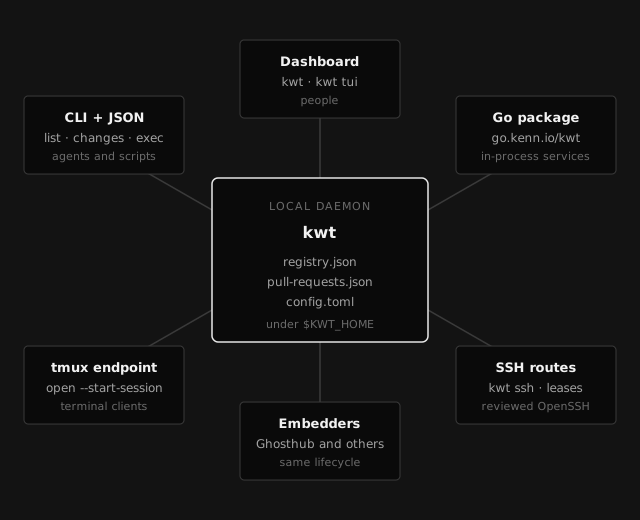
Start with the CLI and its JSON output. It keeps kwt's behavior and exit codes, and your client does not need to discover the daemon. A Go application can build the inventory, removal, inspection, and SSH services in process from
go.kenn.io/kwt. A terminal client that manages its own attachment uses the tmux session endpoint.Ghosthub embeds these services to manage projects, worktrees, pull-request imports, and tmux workspaces on local and SSH-hosted machines. Any client can use the same interfaces.
Documentation
The documentation has the commands, JSON fields, exit statuses, configuration keys, the threat model, and the design notes. Every page has a Markdown version at the same path with a .md suffix, and llms.txt indexes them.